Bug #3378
Add dynamic dropdown next to TDS % field when "TDS Applicable" toggle is ON in Edit Vendor modal
Description
new dropdown should be dynamic and should only appear/activate when the "TDS Applicable" toggle is turned ON.
Files
Updated by Shreya Agarwal 1 day ago
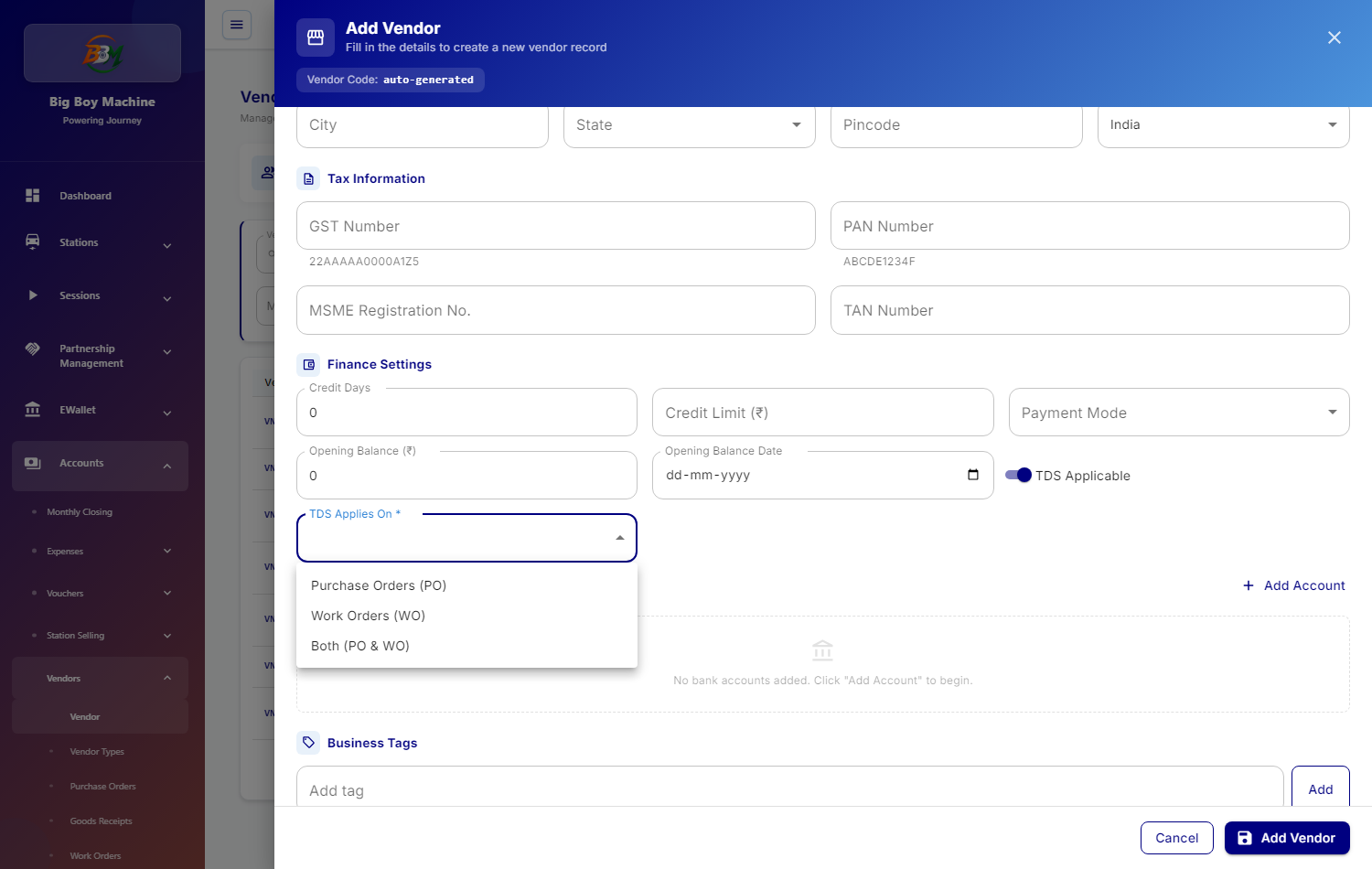
implemented for the new "TDS Applicable on" dropdown on the Finance Vendors page (/accounts/finance-vendors). The requirement was to introduce a dropdown containing three options—Both, Work Order, and Purchase Order—positioned directly beside the existing "TDS %" input field under the Finance Settings section. As per specifications, the dropdown is conditionally rendered and only becomes visible when the "TDS Applicable" toggle switch is enabled.
A centralized options configuration (TDS_APPLICABLE_ON_OPTIONS) and TypeScript definitions (tdsApplicableOn) were defined The UI implementation was applied across both src/pages/CompanyAdmin/FinanceVendorPage.tsx and the shared drawer src/pages/CompanyAdmin/finance/VendorFormDrawer.tsx, using standard Material-UI Select components, internationalization (t(...)), and existing project styling patterns (inputSx, responsive grid layout, and primary focus colors). Form state initialization, edit population, conditional toggle resets, and save payload preparation have all been wired up seamlessly.
Updated by Piyush Vijay about 10 hours ago
- File 3378-1-applies-on-dropdown.png 3378-1-applies-on-dropdown.png added
- File 3378-2-both.png 3378-2-both.png added
- File 3378-5-error-applies-on.png 3378-5-error-applies-on.png added
- File 3378-6-error-rate.png 3378-6-error-rate.png added
- File 3378-7-detail-apex.png 3378-7-detail-apex.png added
- File 3378-7-detail-naren.png 3378-7-detail-naren.png added
Update: Vendor "TDS Applies On" (PO / WO / Both) — reviewed, fixed and tested (#3378)
Branch: feature/shreya/3378-vendor-tds-applicable-dropdown-ui
The branch was checked against the Vendor Management UI Integration Guide (TDS fields). The backend change is live on dev: the vendor API now returns tdsAppliesOn, tdsPercentPo and tdsPercentWo, and the old single tdsPercent is gone.
What the UI does now
Where: Vendor form → Finance Settings. This is in both the Vendor page form (Add / Edit Vendor) and the quick "add vendor" drawer used from Purchase Order / Work Order.
- With TDS Applicable off, no TDS fields are shown and nothing TDS-related is saved.
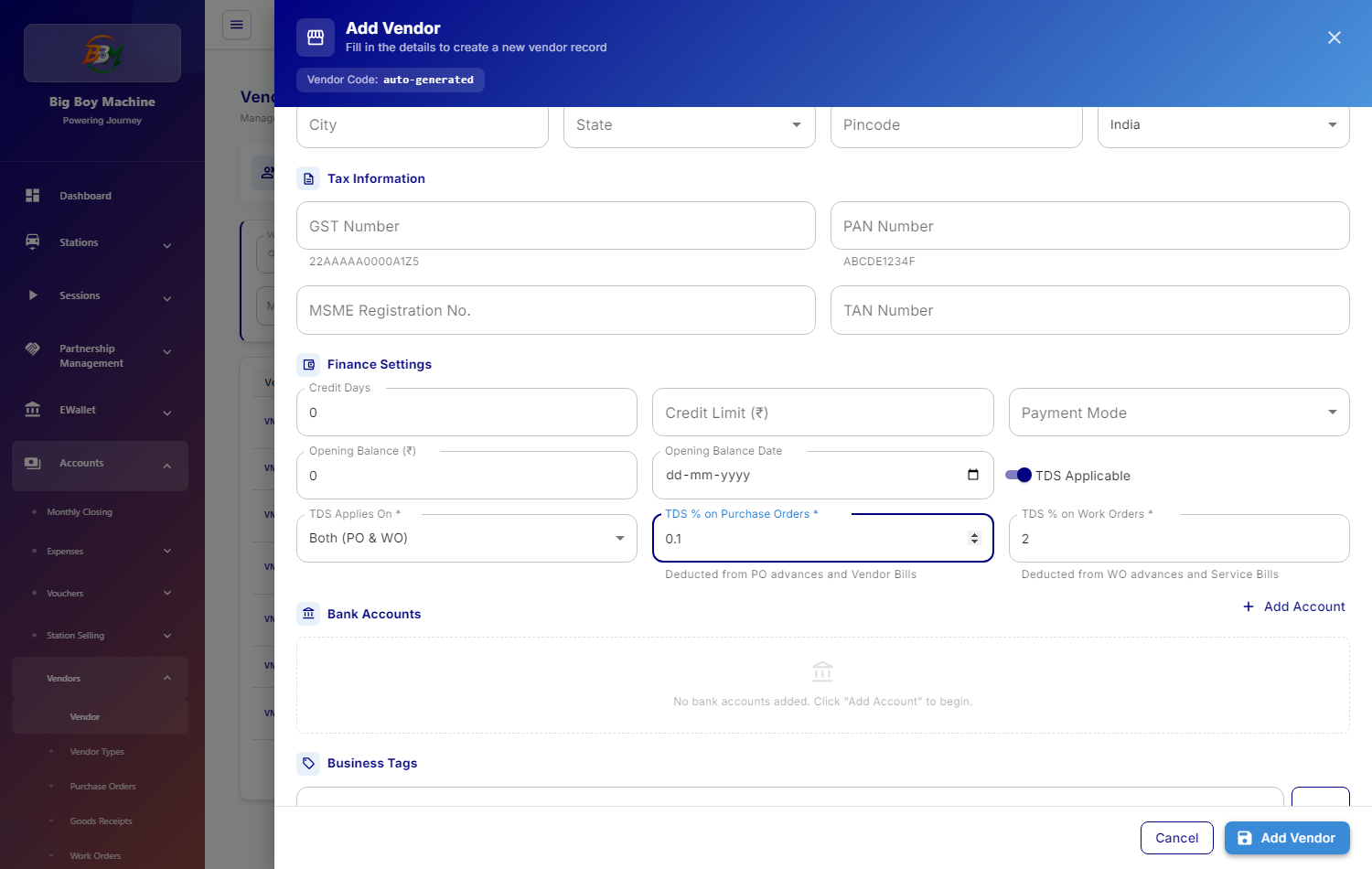
- With TDS Applicable on, a TDS Applies On \* dropdown appears with: Purchase Orders (PO) / Work Orders (WO) / Both (PO & WO).
- Rate fields show by selection:
- PO → "TDS % on Purchase Orders \*" — hint "Deducted from PO advances and Vendor Bills"
- WO → "TDS % on Work Orders \*" — hint "Deducted from WO advances and Service Bills"
- Both → both fields
- Validation:
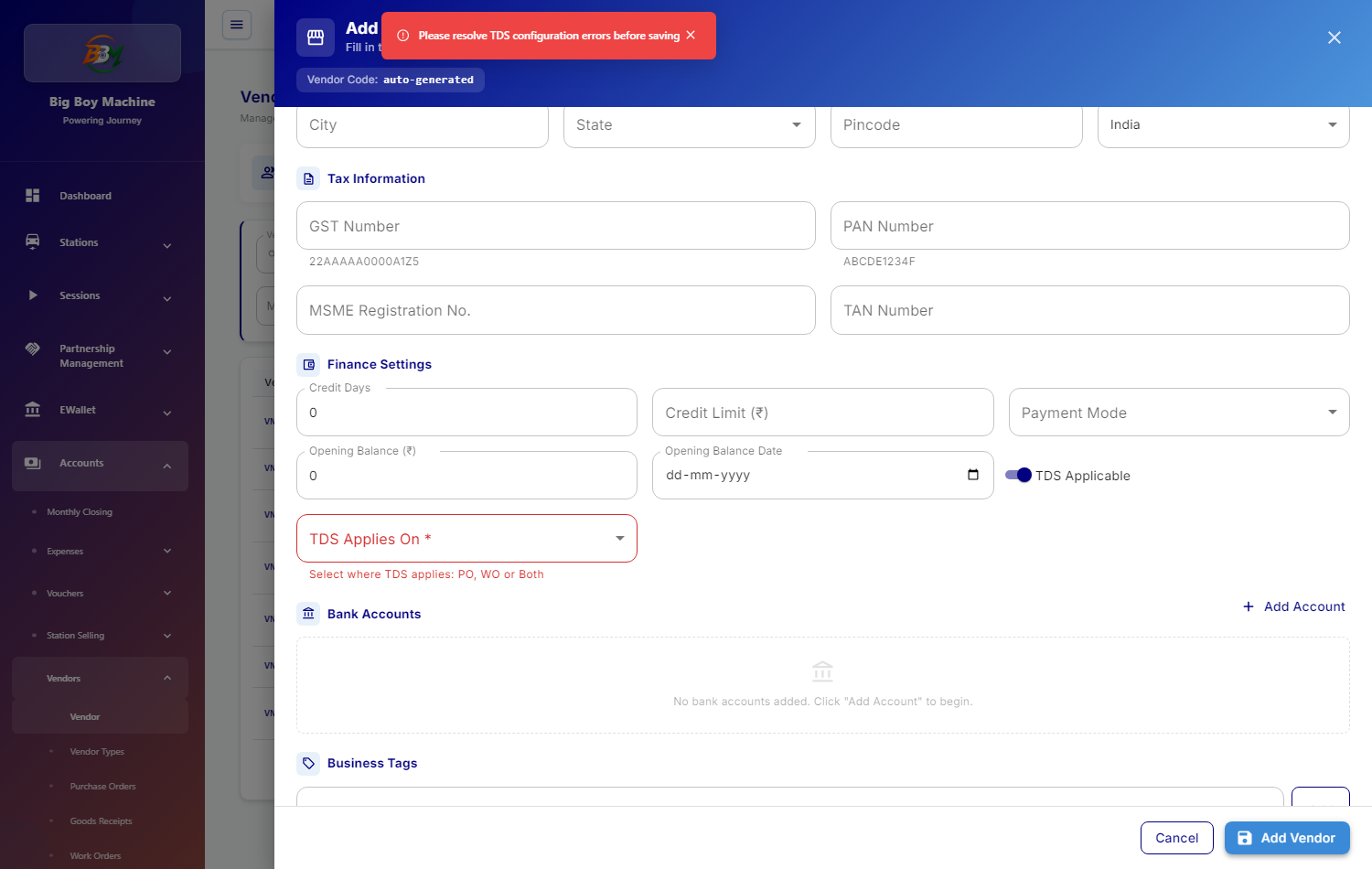
- Applies On empty → "Select where TDS applies: PO, WO or Both"
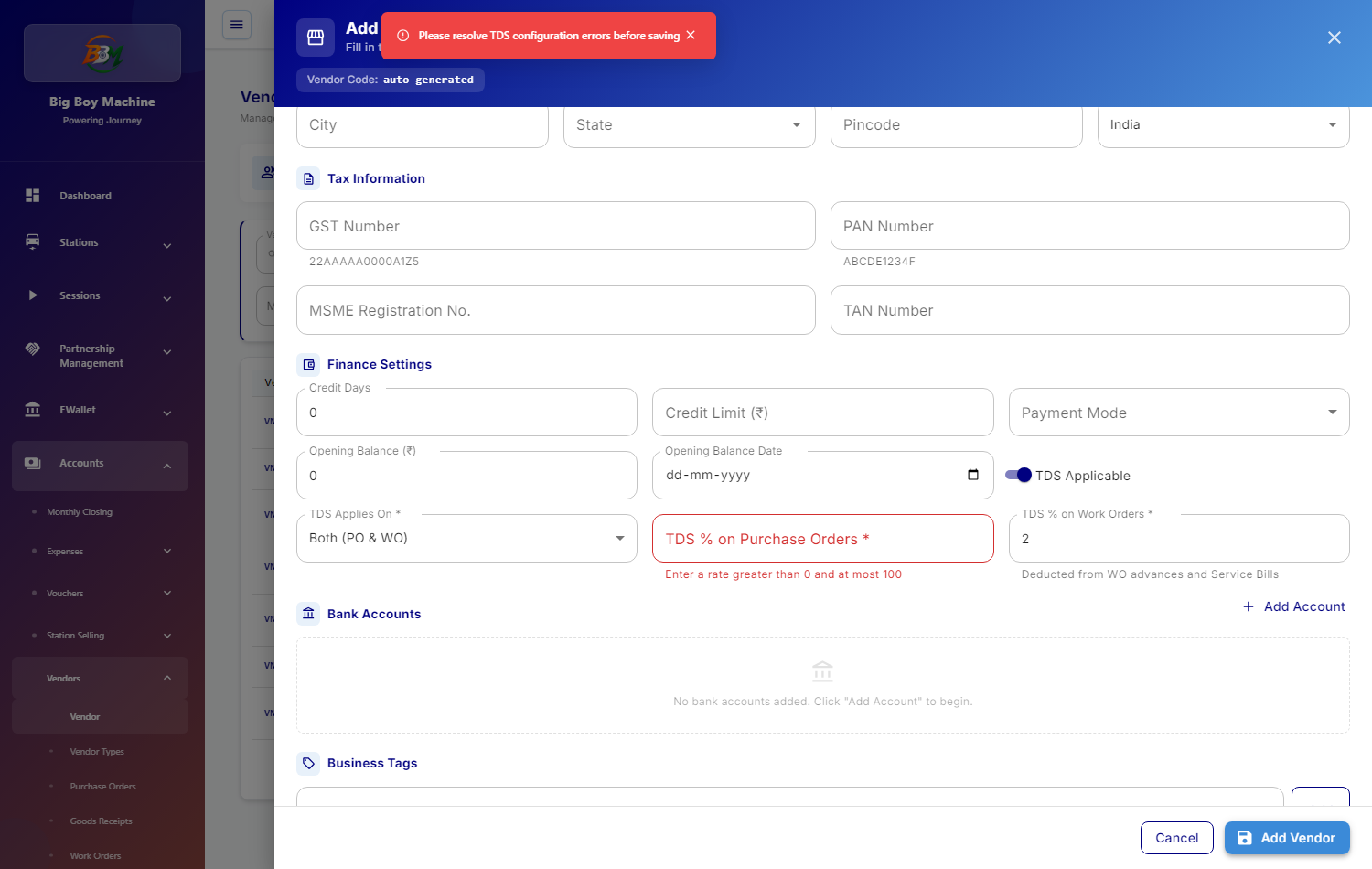
- Rate empty, 0 or above 100 → "Enter a rate greater than 0 and at most 100"
- Save sends only the rate that applies; the other one is sent as null. Switching TDS off sends
tdsAppliesOnand both rates as null. - Edit pre-fills Applies On and the saved rates.
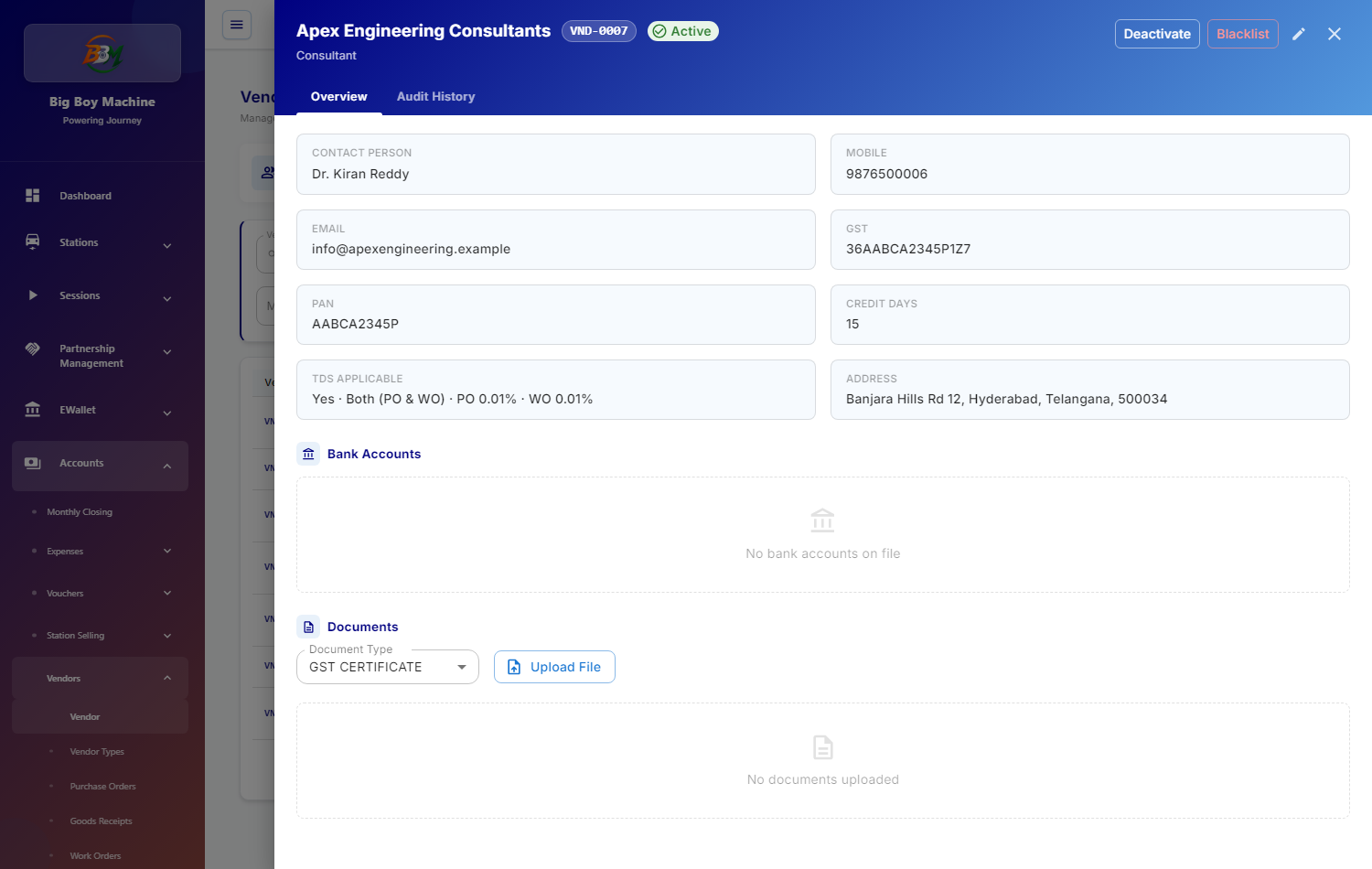
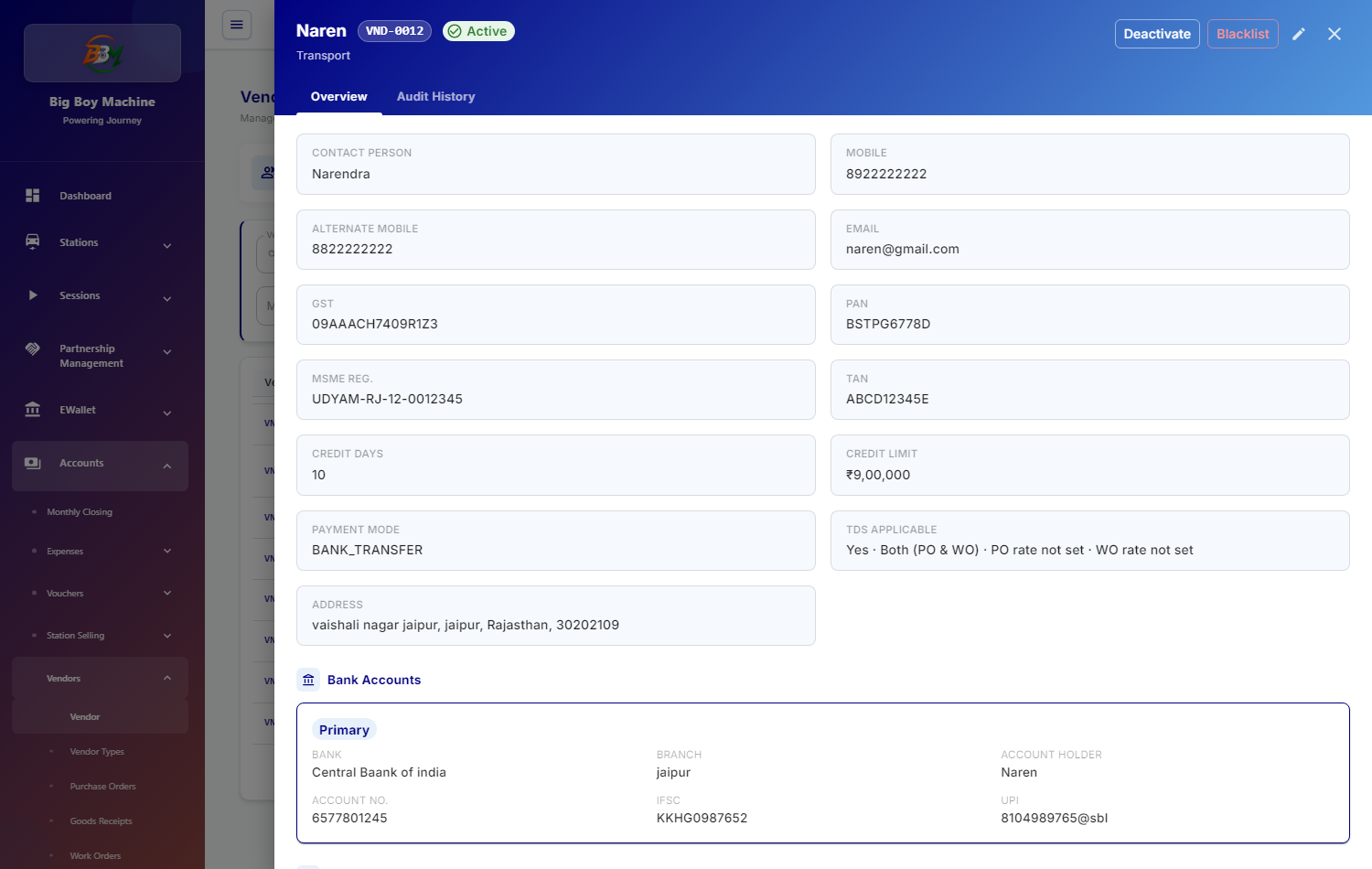
- Vendor detail shows, for example, "Yes · Both (PO & WO) · PO 0.1% · WO 2%". A missing rate shows "rate not set" instead of "null%".
Fixes made on top of the branch
- In the quick-add drawer, typing a PO rate cleared the WO error instead of the PO one, so the red PO error stayed until the next save. Fixed.
- Vendor detail showed "PO: null% · WO: null%" for vendors whose rates are empty. Fixed.
- Unused imports removed; the lint warnings are back to the production level.
Testing on dev (tenant bbm): 15/15 passed
- TDS off: no TDS fields. TDS on: "TDS Applies On \*" with the 3 options and no rate field yet.
- Save with Applies On empty shows "Select where TDS applies: PO, WO or Both".
- PO shows only the PO rate field, WO only the WO field, and Both shows both, each with the right hint.
- Both with the PO rate empty, and a rate of 150, both show "Enter a rate greater than 0 and at most 100". Typing a valid rate clears the error.
- Create payload:
{"tdsApplicable":true,"tdsAppliesOn":"BOTH","tdsPercentPo":0.1,"tdsPercentWo":2}— no oldtdsPercent. - Edit vendor "QA_PO_WO_Testing" (Both 2% / 2%):
- the form is pre-filled;
- changing to WO only sends
tdsPercentPo: null,tdsPercentWo: 2; - switching TDS off sends
tdsApplicable: falsewith Applies On and both rates null.
- Vendor detail: "Apex Engineering Consultants" → "Yes · Both (PO & WO) · PO 0.01% · WO 0.01%"; "Naren" → "Yes · Both (PO & WO) · PO rate not set · WO rate not set".
- Record Payment / advances, Vendor Bills and Service Bills need no change: they take the TDS rate per order / bill from the API. On dev, the eligible orders return the rate for both PO and WO orders.
Note: in this test the save requests were captured to check the payload and not sent to the server, so no vendor data was changed on dev. Please do one real save for each of PO, WO and Both and check the vendor afterwards.
Points for QA
- On dev, vendors Naren and shree cables have TDS = Both but no rates saved. Editing them asks for the rates before saving, which is expected.
- Please also check that advances and bills for a vendor with different PO and WO rates (e.g. PO 1%, WO 2%) deduct the right rate for each order type.
Screenshots are attached.
Updated by Shreya Agarwal about 9 hours ago
implementation and API binding for the enhanced vendor TDS configuration on the Finance Vendors page (/accounts/finance-vendors) have been finalized. Following the backend Swagger schema provided today, the previous single-rate model was upgraded to support multi-scope TDS deductions across three specific endpoints src/pages/CompanyAdmin/finance/VendorFormDrawer.tsx were seamlessly synchronized to handle tdsApplicable (boolean), tdsAppliesOn ('PO' | 'WO' | 'BOTH'), tdsPercentPo (number | null), and tdsPercentWo (number | null), while preserving backwards compatibility.
The user interface now incorporates dynamic conditional visibility adhering strictly to design guidelines and responsive grid standards without hardcoding. When the TDS Applicable toggle is switched on, users are presented with the TDS Applies On * dropdown populated via a centralized constant (TDS_APPLIES_ON_OPTIONS) with translated labels: Purchase Orders (PO), Work Orders (WO), and Both (PO & WO). Dependent input fields render conditionally: selecting Both (PO & WO) displays dual input boxes for both PO and WO rates side-by-side; selecting Purchase Orders (PO) renders only the PO rate field; and selecting Work Orders (WO) renders only the WO rate field. Respective helper texts ("Deducted from PO advances and Vendor Bills" and "Deducted from WO advances and Service Bills") guide the user on deduction contexts, and switching between options automatically resets irrelevant percentage values.
Comprehensive client-side validation and visual error handling were implemented to protect backend data integrity. If the form is submitted without selecting a scope, the dropdown field enters an error state with the message "Select where TDS applies: PO, WO or Both". Similarly, if an active rate field is left empty or outside the permissible range (0.01% – 100%), it highlights in red with "Enter a rate greater than 0 and at most 100", and a notification prompts the user before blocking the network call.